Showing posts with label i. Show all posts

1.19.2010

InfoGenius Productivity Pak: Frommer's Travel Guide


story | gameplay | my thoughts |
level structure | controls | options

BASIC INFO:
Title ....... InfoGenius Productivity Pak: Frommer's Travel Guide
Players ..... 1
Genre ....... Nongame
Subgenre .... Utility
Platform .... Game Boy (1991)


STORY:
Not applicable.


GAMEPLAY:
At the menu screen, use the D-pad and A button to choose "CITIES" or "800#'S". In CITIES, scroll up and down using the D-pad to choose one of the 15 U.S. cities. Press select to get a brief travel guide synopsis of the city ("This place is great! Come spend your money here!"). Press A for access to information that might have been useful to travelers in 1991, including names, addresses, phone numbers, prices, and methods of payment accepted by hotels, restaurants, shops, transportation, tourist traps, and so on.

"800#s" is a repository of toll free numbers for various would-be-useful places and services.


THOUGHTS:
This is an interesting but completely useless relic that only the hardcore collector should seek. The passage of time has rendered much of the information on the cartridge obsolete. Obviously, if you were genuinely interested in this kind of software, you can find a better product (one that is prettier, more easily navigable, includes more and better information, and is more customizable) for a smaller and rechargeable modern device.


LEVEL STRUCTURE:
None.


CONTROLS:
D-pad .... move cursor
select ... learn more about a city; learn more about a business
start .... no apparent use
A ........ make choice
B ........ cancel choice; go back


OPTIONS:
No options.


InfoGenius Productivity Pak: Personal Organizer


story | gameplay | my thoughts |
level structure | controls | options

BASIC INFO:
Title ....... InfoGenius Productivity Pak: Personal Organizer (North America)
Players ..... 1
Genre ....... nongame
Subgenre .... personal organizer
Platform .... Game Boy (1991)


InfoGenius: Turning your retro gaming device into a worthless piece of shit!STORY:
None.


GAMEPLAY:
Keep appointment notations on an electronic calendar, review those appointments and/or the calendar, maintain a phone directory, access a list of (totally obsolete) toll-free phone numbers, find out what time it is in another part of the world, use a calculator, make notes in the notepad.


The 800 numbers are good, but I really want some 900 numbers.THOUGHTS:
This provides you with nothing that you can't do better on your computer or laptop--or phone, iPod, or jailbroken gaming device.


LEVEL STRUCTURE:
There are none.


CONTROLS:
D-pad .... move cursor; see next/previous month/year on calendar; change date
select ... move cursor when typing on notepad
start .... return to previous menu screen
A ........ choose menu option; enter letter/number
B ........ delete letter/number


OPTIONS:
Nope.


InfoGenius Productivity Pak: Spell Checker and Calculator


story | gameplay | my thoughts |
level structure | controls | options

BASIC INFO:
Title ....... InfoGenius Productivity Pak: Spell Checker and Calculator
Players ..... 1
Genre ....... nongame
Subgenre .... general utility
Platform .... Gameboy (1991)


STORY:
None.


GAMEPLAY:
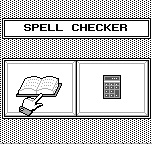
As the name indicates, this includes both a spell checker and a calculator. The spell checker allows you to type in a word to have it checked against the software's word bank. Since this was published in 1991, the neologisms of the last 20 years are not included in the word bank; you will be unable to check the spelling of your BLOG or TRUTHINESS here. No, you cannot even find your INTERNET.

The word bank, of course, is censored to remove obscenities and racial slurs. I approve of this, as it is hilarious when someone tries to be offensive and cannot spell their insults correctly.

Of course, if you are reading this, then chances are that most of your programs already have built-in spell checkers. Not only that, but they likely check your spelling as you type--not just in word processors, but in your browser, instant messaging, and such whatnot hip internet stuff. And, of course, dictionary.com is always a couple of clicks away.

The calculator allows you to perform the 4 basic arithmetic operations; it also lets you find square roots. It does not follow the order of operations and there are no parentheses.


THOUGHTS:
This is an interesting curiosity for the collector--well, the spell checker's word bank is, anyway. The calculator's a joke (just buy a $2 relic from your local Goodwill if you don't already own a cellphone). As for the non-collector, this is worthless, like most retro non-games.


LEVEL STRUCTURE:
Nope.


CONTROLS:
D-pad .... move cursor
select ... return to previous menu screen
start .... choose menu option
A ........ choose a letter
B ........ backspace


OPTIONS:
Not really.


InfoGenius Systems: Berlitz French Translator


story | gameplay | my thoughts |
level structure | controls | options

BASIC INFO:
Title ....... InfoGenius Systems: Berlitz French Translator
Players ..... 1
Genre ....... nongame
Subgenre .... language software, foreign language aid, french
Platform .... Game Boy


STORY:
None.


GAMEPLAY:
Choose a "side" of the dictionary/translator: English-to-French or French-to-English. Whichever side you choose, you are prompted to choose "WORDS", "PHRASES", "NUMBERS", or "CONVERSATIONS". Further explanation below:
    WORDS: Type in a word to get the French (or English) equivalent. For example, after choosing English-to-French, a search for "LIGHT" gives the response:
      ALLUMER (V)
      CLAIR (ADJ)
      LÉGER (ADJ)
      LUMIÈRE (F)
    One assumes that ALLUMER is the verb "to light", CLAIR and LÉGER are adjectives, and LUMIÈRE is a feminine noun. There is no distinction made between the two adjectives, so the reader has to guess which mean "not heavy" and which means "not dark".

    Male nouns are indicated with the parenthetical notation (M). Adverbs are indicated with (ADV). Articles with (ART), and so on.

    PHRASES: If you have ever looked at a "Pocket guide to French", you can pretty much guess what this part looks like. There are 7 basic options (BASICS, TRANSPORTATION, RELAXING, SHOPPING, EMERGENCIES, EATING OUT, or ACCOMODATION), each of which opens up to 3 more options. Once you find the actual phrases, 3 clicks in, you must press down and up on the control pad to look at different ones. (For the record, "I DON'T UNDERSTAND" is under BASICS: LANGUAGES.)

    NUMBERS: Type in a number on a number pad. You will get the written equivalent in either French or English, depending on which side of the dictionary you are on.

    CONVERSIONS: Currency and metric converters. The currency converter is hilariously outdated and useless, though kind of quaint. The metric converter is actually useful. The English-to-French side will convert miles to kilometers, M/H to KM/H, and Fahrenheit to Celsius; the French-to-English side does it in reverse.


THOUGHTS:
This may be interesting to the advanced English/French student, particularly if French is the L1. If my experiences with Spanish textbooks from the era are anything to judge by, it's possible that the French word bank contains words or phrases that were humorously outdated at the time the game was published; it's also likely the word bank was inconsistent in what Francophone countries it took vocabulary from.

It may also be of interest to the average language nerd. It gives a snapshot of what sort of phrases, in 1991, were considered "basic" to the traveler. It also shows you what sort of words and phrases were not yet considered words (internet) or culturally important enough to be worthy of inclusion (video game, videogame). Even the censored words are interesting.

LEVEL STRUCTURE:
No levels here.


CONTROLS:
D-pad .... move cursor
select ... return to previous menu screen
start .... choose menu option; enter word/number
A ........ choose menu option; choose letter, choose number
B ........ backspace


OPTIONS:
Nope.