Showing posts with label 1pov. Show all posts

1.15.2010

Mary-Kate and Ashley: Pocket Planner


story | gameplay | my thoughts |
level structure | controls | options

BASIC INFO:
Title ....... Mary-Kate and Ashley: Pocket Planner (North America, Europe)
Players ..... 1 (with limited multiplayer functionality)
Genre ....... edutainment
Subgenre .... organizer
Platform .... Game Boy Color (2000)


STORY:
None.


GAMEPLAY:
Upon starting the software for the first time (or everytime after the battery dies), you are prompted to set the date and time. Then, you are asked for your first name, middle name, last name, street address, zip code, city, state, phone number, birthday, favorite color. You can skip all of these except entering your first name.

In the main menu, there are 6 options:
  • Calendar: Look at the calendar, add and edit events.
  • Friends: Reveals a submenu with 4 choices -
    • G-mail: I'm taking a guess here, but I think this is something that lets you send messages to friends with a copy of the game.
    • Friends: Maintain an address book.
    • About You: You can edit your details here.
    • Match Up: Have a friend type in the same stuff you did when you first booted up the game. You will then be told how much you have in common.
  • To Do: Stuff that is on the calendar for you to do today.
  • Fun Stuff: Reveals a submenu with 6 choices -
    • Games: Reveals a submenu with 4 choices.
      • Drop to Shop: Help MK and Ashley shoplift! Catch the goods that one of them drops, while avoiding mops.
      • Fash Machine: Slots. You aren't actually betting anything, though.
      • Sliders: A 4x4 sliding puzzle.
      • Match 'em: Memory. 30 cards are turned, face down. You turn them over, 2 at a time, trying to make matches. Matches are removed, non-matches are flipped back onto their face.
    • Crush: A "Crush Indicator". You are instructed to point the Game Boy and press A, with the implication that you will find out whether or not the person you are pointing at has a crush on you. Apparently, my laptop has a pretty big thing for me (I love you, too, Lappy).
    • Ask Ashley: Magic 8 ball, essentially.
    • Clue: A pet sim. Feed and play with a dog named Clue.
    • Sun Sign: A horoscope...thing. No, it doesn't tell you how your day will be in vague terms. It tells you how compatible you are with people of other signs.
    • Pic Gallery: View pictures you unlock. Gamefaqs indicates that a new picture is unlocked for every 10k points you win in games, and that 16 pictures can be unlocked in this manner.
  • Tools: Reveals a submenu with 6 options -
    • Stopwatch: It's a stopwatch. Does not show time until you stop it.
    • Phone Dialer: Apparently designed to dial phone numbers for you by screeching into a handset. Kind of neat, if not entirely practical.
    • Beam: Appears to be some sort of multiplayer connectivity.
    • Clock: It's a clock.
    • About You: Like the one above, it allows you to reset (or set for the first time) information about yourself.
    • Help: A small, in-game manual.
  • Options: The option menu lets you adjust music and sound. It also lets you change the date and time, and shows you how much memory is taken up by all the stuff you've typed into the software. There's also a mysterious "color" setting, which has "on" and "off" options, but it doesn't seem to do anything.
This software is compatible with the Game Boy Printer. On the vast majority of screens, there is a print button, allow you to...well, print stuff, I assume.


THOUGHTS:
This is one for the collectors. I particularly like the Phone Dialer (haven't used a landline since I was a kid) and the in-game manual (still waiting for this to become standard).

The games are terrible. If you just want a fun game, don't get this.


LEVEL STRUCTURE:
There are levels in the shoplifting game.


CONTROLS:
D-pad .... move cursor
select ... main menu
start .... start screen
A ........ confirm choice
B ........ cancel


OPTIONS:
You can turn music on or off. You can turn sound on or off.


1.09.2010

Shanghai


story | gameplay | my thoughts |
level structure | controls | options

BASIC INFO:
Title ....... Shanghai (North America, Japan)
Players ..... 1
Genre ....... puzzle
Subgenre .... matching, tile removal
Platform .... Game Boy (1990)


STORY:
none


GAMEPLAY:
This is a bare-bones game of Mahjong solitaire. Upon starting a game, you are presented with a randomized puzzle in the classic "turtle" pattern.

That's pretty much it.

There is a nice piece of sprite artwork on the title screen, and a kickin' rad dragon when you complete a puzzle.


THOUGHTS:
Mahjong Solitaire in monochrome on a tiny screen is really hard on the eyes. Besides that, If you have a portable device that has internet connectivity, you already have this game.

Besides that, there are many other versions of Mahjong Solitaire that are, frankly, much better. Shanghai Pocket (a dual mode Game Boy Color game) immediately springs to mind as being very similar to this game, but offering the advantages of color and multiple puzzle layouts. I also really enjoyed Mahjong Quest Expeditions for the DS, which has one less notable feature (you cannot change the tile type) but many new features, not the least of which is touchscreen functionality.


LEVEL STRUCTURE:
There is only one "level," and you are taken directly to it upon starting the game.


CONTROLS:
D-pad .... move cursor
select ... menu
start .... doesn't appear to do anything
A ........ select
B ........ deselect; cancel


OPTIONS:
In the menu you can access by pressing select, you have access to an OPTION menu and a BGM menu. The OPTION menu allows you to select HINT (shows you hints), PLAYBACK (undo), and FACE (allows you to change the tileset to symbols more familiar to Western audiences). BGM allows you to choose the background music from among 3 choices. Unfortunately, you cannot turn the music off.


EXTRA NOTES:
Apparently, the use of the name Shanghai in reference to Mahjong Solitaire is trademarked by Activision. Activision does appear in the game's opening credits ("original copyright (c)1986 Activision, Inc.)


Solitaire FunPak


story | gameplay | my thoughts |
level structure | controls | options | credits

BASIC INFO:
Title ....... Solitaire FunPak
Players ..... 1
Genre ....... parlor
Subgenre .... card
Platform .... Game Boy (1994), Game Gear (1994)


STORY:
Don't be silly.


GAMEPLAY:
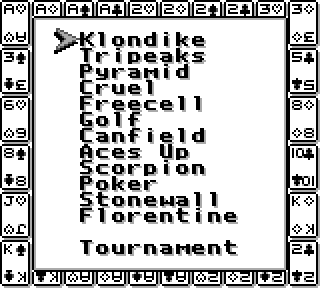
Solitaire FunPak is an electronic collection of 12 solitaire games. The varieties included are Klondike, Tripeak, Pyramid, Cruel, Freecell, Golf, Canfield, Aces Up, Scorpion, "Poker", Stonewall, and Florentine.

It's got Klondike and Freecell. The other games don't matter.You can also play a Tournament, which is a series of games in a row. There are 4 choices: Standard, Championship, Custom, and Custom timed.
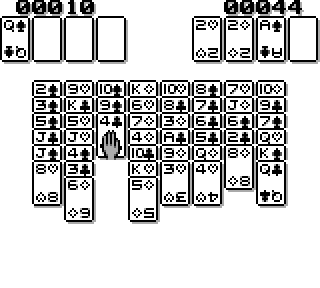
Standard and Championship have has you playing one of each of the 12 games. I do not know what the difference is. Custom allows you to choose which games you play. Custom timed allows you to choose which games you play, and to set a time limit on each game (when the limit is up, you are automatically moved to the next game).


THOUGHTS:
The interface and visuals are barely adequate. Lack of color is a major negative. It's completely worthless if you have a portable internet-capable device, of course. Plenty of internet sites allow you to play solitaire, with better visuals, sound, options, and handy explanations nearby.


LEVEL STRUCTURE:
n/a


Lack of color kinda sucks.CONTROLS:
D-pad .... move cursor
select ... doesn't appear to have any function
start .... pause/unpause; confirm (in certain places)
A ........ cancel (in certain places), cancel and return cursor to default position (in-game); confirm (in certain places)
B ........ confirm (in certain places)


OPTIONS:
The options in this game are actually fairly robust.

If you have chosen to play a game by itself, outside of Tournament mode, press start to bring up the following menu options: redeal same, undo, deal again, new game, game over, music (theme 1, theme 2, off). Additionally, Klondike and Canfield will prompt you to make some choices upon starting a game (choose between flip 3 or flip 1; draw many times, draw 3 times only, or draw once only) as will Golf (play on king or flip on king).

Tournament mode is much more limited in options, allowing you to skip games at any time (but not return to them) and change the background music. You are not given the additional prompts when playing Klondike, Canfield, or Golf.


CREDITS:
screen 1:
    DESIGNED, DEVELOPED
    & COPYRIGHT (C) 1994
    BEAM SOFTWARE P/L

    PRODUCED BY
    INTERPLAY PRODUCTIONS

    LICENSED BY NINTENDO
screen 2:
    INTERPLAY tm

screen 4 (let the title screen, screen 3 sit without pressing any buttons to trigger the appearance of screen 4):
    BEAM SOFTWARE
    CLIVE BARRETT ....... PROGRAMMING
    GREG HOLLAND ........ ARTWORK
    SIMON HART .......... ARTWORK
    MARSHALL PARKER ..... MUSIC + SOUND EFFECTS
    ANN DAVIE ........... PRODUCER (BEAM)
    KERRY GARRISON ...... PRODUCER (INTERPLAY)
    PRESS START TO PLAY